Материал: Радовель В.А. - Английский Язык
СОДЕРЖАНИЕ
1. Ознакомьтесь с терминами текста 1.
3. Просмотрите текст 1 еще раз. Ответьте на вопросы, используя информацию текста.
5. Вспомните образование и случаи употребления The Past Simple Tense.
6. Ознакомьтесь с терминами текста 2
7. Прочтите текст 2 и скажите, что такое компьютер и каковы его основные функции.
4. Прочтите, переведите и запомните следующие выраже ния:
9. Найдите в тексте 2 английские эквиваленты следующих словосочетаний:
11. Выполните письменный перевод текста 3 по вариантам.
1. Выберите вариант, который лучше всего выражает глав ную идею текста 2.
2. Вставьте необходимые слова вместо пропусков.
3. Подберите к терминам, данным в левой колонке, определения, представленные справа.
1. Ознакомьтесь с терминами текста 1.
1. Ознакомьтесь с терминами текста 1
2. Прочтите текст и скажите, о каких первых вычислительных приборах рассказывается в нем.
3. Просмотрите текст еще раз. Ответьте на вопросы, используя информацию текста.
5. Переведите следующие цепочки существительных:
6. Подберите к терминам, данным в левой колонке, опре деления, представленные справа.
10. Ответьте на вопросы, используя информацию текста.
11. Найдите в тексте английские эквиваленты следующих словосочетаний:
12. Вспомните значение новых слов и догадайтесь о зна чении их производных.
2. Прочтите текст и скажите, о каких типах компьютеров и сферах их применения вы узнали.
3. Просмотрите текст еще раз. Ответьте на вопросы, ис пользуя информацию текста.
4. Найдите в тексте английские эквиваленты следующих словосочетаний:
5. Образуйте (и переведите) имена существительные от приведенных ниже глаголов с помощью суффиксов:
6. Переведите предложения, содержащие Participle I и Participle II, в функции обстоятельства.
9. Ответьте на вопросы, используя информацию текста.
10. Найдите в тексте английские эквиваленты следующих словосочетаний:
12. Озаглавьте каждый компонент текста и составьте небольшой реферат к нему (по вариантам).
2. Согласуйте слова в левой колонке с их интерпретацией, предложенной справа.
3. Просмотрите текст еще раз. Дайте ответы на вопросы, используя информацию текста.
8. Ознакомьтесь с терминами текста 2.
3. Просмотрите текст еще раз. Ответьте на вопросы, используя информацию текста.
4. Найдите в тексте английские эквиваленты следующих словосочетаний:
6. Найдите в тексте слова, близкие по значению следующим:
7. Переведите предложения, содержащие Perfect Participle Active и Perfect Participle Passive.
8. Ознакомьтесь с терминами текста 2.
14. Выполните письменный перевод текста по вариантам.
4. Найдите в тексте английские эквиваленты следующих словосочетаний:
6. Переведите предложения, содержащие независимый причастный оборот.
14. Ознакомьтесь с терминами текста 3.
3. Ответьте на вопросы, используя информацию текста.
4. Найдите в тексте английские эквиваленты следующих словосочетаний:
12. Расшифруйте следующие аббревиатуры и переведите их.
13. Переведите безличные предложения. Обратите внима ние на их специфику.
14. Вспомните формы причастий, проанализируйте и пе реведите следующие предложения:
16. Прочтите текст и составьте письменно реферат на английском языке.
1. Вставьте необходимые слова вместо пропусков.
2. Прочтите текст и объясните, как вы понимаете термин«компьютерное программирование».
3. Просмотрите текст еще раз и ответьте на вопросы, ис пользуя информацию текста.
4. Найдите в тексте английские эквиваленты следующих словосочетаний:
6. Переведите предложения, содержащие сослагательное наклонение.
8. Прочтите текст и объясните, что представляют собой языки программирования.
13. Выполните перевод следующих текстов письменно по вариантам.
14. Прочтите тексты (по вариантам) и составьте рефераты на английском языке.
3. Определите неличные формы глагола, содержащиеся в следующих предложениях. Переведите их.
15. Прочтите внимательно текст. Составьте на английском языке план текста, выделив основные его темы. План можно составить в вопросной, назывной или тезисной форме. Познакомьтесь с образцами планов, представленными после текста; сравните со своим планом.
MEMORY
It is interesting to note that memory, one of the basic components of the computer, is often called storage. It stores calculation program, the calculation formulae, initial data, intermediate and final results. Therefore, the functions of the computer memory may be classified in the following way. Firstly, the computer memory must store the information transmitted from the input and other devices. Secondly, memory should produce the information needed for the computation process to all other devices of the computer.
95 Unit 7. Storage
G enerally,
memory consists of two main parts called themain,
primary or internal, memory and the secondary, or external
memory. The advantage of the primary memory is an extremely
high speed. The secondary memory has a comparatively low speed,
but it is capable of storing far greater amount of
information than the main memory. The primary storage takes
a direct part in the computational process. The secondary
storage provides the information necessary for a single step in
the sequence of computation steps.
enerally,
memory consists of two main parts called themain,
primary or internal, memory and the secondary, or external
memory. The advantage of the primary memory is an extremely
high speed. The secondary memory has a comparatively low speed,
but it is capable of storing far greater amount of
information than the main memory. The primary storage takes
a direct part in the computational process. The secondary
storage provides the information necessary for a single step in
the sequence of computation steps.
The most important performance characteristics of a storage unit are speed, capacity and reliability. Its speed is measured in cycle time. Its capacity is measured by the number of machine words or binary digits. Its reliability is measured by the number of failures (отказ) per unit of time.
План в вопросной форме.
What is memory?
What is the function of memory?
What are the main parts of memory?
What are advantages and disadvantages of a storage unit?
What are their functions?
What are performance characteristics of the main and secondary memory?
What units are performance characteristics measured by?
План в назывной форме
The definition of memory.
The main functions of memoiy.
Classification of memory.
Advantages and disadvantages of memory components.
The functions of memory components.
Performance characteristics of memory.
The units for measuring the performance characteristics of memory.
План в тезисной форме.
Memory is one of the basic components of the comput er.
Memory stores initial data, intermediate and final results.
It produces the information needed to other devices of the computer.
Английский язык. Основы компьютерной грамотности 96
M
 emory
consists of the main (internal) and the secondary
(external) storage.
emory
consists of the main (internal) and the secondary
(external) storage.The main memory has high speed, but small capacity; the secondary memory possesses lower speed but greater ca pacity.
The main memory performs computation; the secondary memory provides information sequentially, step by step.
The performance characteristics — speed, capacity and reliability — are measured by cycles, binary digits and the number of failures per unit of time.
TESTS 1. Вставьте вместо пропусков необходимые слова.
1. The time required for the computer to locate and transfer data in the storage device is called the data time.
a) sequence; b) access; c) value
2. memories have no moving parts.
a) electronic; b) mechanical; c) electromechanical
3. Magnetic were the main elements used for pri mary memory in digital computers for many years.
a) cores; b) tapes; c) disks
4. is more commonly used for memory at present.
a) bipolar semiconductor; b) MOS; c) field-effect transistor
5. Magnetic disks constitute the storage media.
a) internal; b) primary; c)secondary
6. Data are stored in codes in primary as well as in
secondary storage.
a) digital; b) binary; c) numerical
7. Data access time is in electronic memories than
that in electromechanical memories.
a) longer; b) much longer; c) shorter
8. Electronic memories have capacities for data stor-
age.
a) more; b) larger; c) less
97 Unit 7. Storage
2 .
Согласуйте слова левой колонки с их
интерпретацией,предложенной
справа.
.
Согласуйте слова левой колонки с их
интерпретацией,предложенной
справа.
1. Primary a) one of the performance characteris-
tics of storage measured in binary digits;
2. Secondary b) memory that has random access to
the information;
Magnetic disc c) combination of units of information;
Binary codes d) the main method of secondary stor-
age performing both sequential and random storage;
5. RAM e) area of memory where protected pro-
grams can be read from but not written on;
6. Bit f) a fixed number of consecutive bits
representing a character;
7. Byte g) the principal flexible second storage
circuit element;
8. ROM h) part of memory having lower speed
but greater capacity;
9. Floppy i) a unit of information or binary digit;
10. Capacity . j) the most expensive part of memory
having the least capacity and the fastest access time.
Unit 8 CENTRAL PROCESSING UNIT
1 Ознакомьтесь с терминами текста 1.
central processing unit (CPU) - центральный процессор
(ЦП)
interchangeably [,mt3'tfemd33bli] - взаимозаменяемым
образом
precisely [pn'saish] — точно
internal memory - внутренняя память; внутреннее ЗУ activity [sk'tiviti] - деятельность; работа; действия операции to issue ['isju:] - посылать (сигнал); выводить, выдавать
(сообщение) response [n'spons] - ответ; отклик; реакция; отвечать;
реагировать
to interprete [m'tspnt] - интерпретировать; истолковывать;
according to [a'bdin ts] - согласно; в соответствии с level - уровень; степень; мера; выравнивать input-output port - порт ввода-вывода control unit (CU) [bn'troul 'ju:nit] - устройство управления arithmetic-logical unit (ALU) - арифметико-логическое
устройство
switch ['switJl - переключатель; коммутатор; переключать; переходить direct [di'rekt] - направлять; адресовать; указывать;
прямой; непосредственный step-by-step operations - пошаговые операции to select [ss'lekt] - выбирать; выделять (на экране) on the other hand - с другой стороны exponentiation [ekspe'nenji'eifn] - возведение в степень
99 Unit 8. Central Processing Unit
c all
for —требовать;
предусматривать
all
for —требовать;
предусматривать
to load ['loud] — загружать; выполнять загрузку
2. Прочтите текст и скажите, какой компонент составляет сердце компьютерной системы и в чем заключается его функция.
Text 1. CENTRAL PROCESSING UNIT
It is well known in computer science that the words 'computer' and 'processor' are used interchangeably. Speaking more precisely, 'computer* refers to the central processing unit (CPU) together with an internal memory. The internal memory, control and processing components make up the heart of the computer system. Manufactures design the CPU to control and carry out basic instructions for their particular computer.
The CPU coordinates all the activities of the various components of the computer. It determines which operations should be carried out and in what order. The CPU controls the operation of the entire system by issueing commands to other parts of the system and by acting on responses. When required it reads information from the memory, interprets instructions, performs operations on the data according to the instructions, writes the results back into the memory and moves information between memory levels or through the input-output ports.
In4igital computers the CPU can be divided into two functional units called the control unit (CU) and the arithmetic-logical unit (ALU). These two units are made up of electronic circuits with millions of switches that can be in one of two states, either on or off.
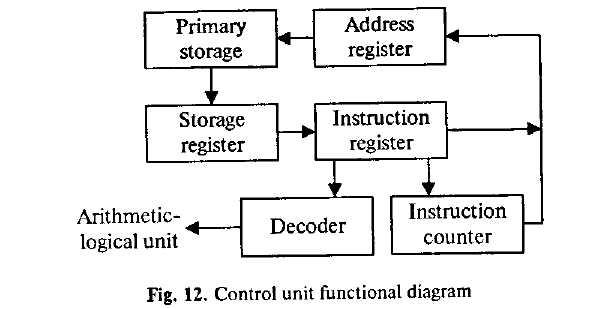
The function of the CU within the central processor is to transmit coordinating control signals and commands. The control unit is that part of the computer that directs the sequence of step-by-step operations of the system, selects instructions and data from memory, interprets the program instructions, and controls the flow between main storage and the arithmetic-logical unit.
The ALU, on the other hand, is that part of the computer in which the actual arithmetic operations, namely, addition, subtraction* multiplication, division and exponentiation, called for in the instructions are performed.
Английский язык. Основы компьютерной
грамотности 100
3. Просмотрите текст еще раз. Ответьте на вопросы, ис пользуя информацию текста.
1. What words in computer science are used interchangeably and why? 2. What components make up the heart of the computer system. 3. What is the function of the CPU? 4. In what way does the CPU control the operation of the whole system? 5. Name the sequence of operations the CPU performs (use five verbs). 6. What are the CPU functional units made of? 7. What is the function of the CU? 8. What operations are performed in the ALU? 9. Where are data processed? 10. Where are data to be processed loaded into?
4. Найдите в тексте английские эквиваленты следующих словосочетаний:
Хорошо известно; к компьютеру относятся; внутренняя память; составлять суть; выполнять; координировать деятельность; определяя в каком порядке; управлять работой всей системы; при необходимости; в соответствии с командами; уровни памяти; порт ввода-вывода; переключатели; режим включения или выключения; передавать сигналы; указывать последовательность пошаговых операций; основная память; управлять ходом выполнения програм-
101 Unit 8. Central Processing Unit
м ы;
с другой стороны; выполнять вычитание,
сложение, возведение
в степень, деление, умножение; для того
чтобы.
ы;
с другой стороны; выполнять вычитание,
сложение, возведение
в степень, деление, умножение; для того
чтобы.
5. Вспомните значение новых слов и попытайтесь перевести словосочетания, употребляемые с этими словами.
Direction: backward direction; clockwise direction; counterclockwise direction; data direction; forward direction; inverse / reverse direction; negative direction; positive direction; printing direction; transmission direction.
Level: access level; application level; data level; device level; difficulty level; error level; function level; hardware level; high level; input level; output level; performance level; presentation level; program level; protection level; resource level; security level; software level; structural level; system level; transmisson level.
Processor: arithmetic processor; central processor; command processor; control processor; data processor; error processor; general-purpose processor; special-purpose processor; image processor; language processor; mail processor; message processor; numeric processor; parallel processor; peripheral processor; text processor.
Switch: to switch between programs; to switch between windows; to switch disks; to switch on; to switch off; to switch over; binary switch; command switch.
Step: conversion step; final step; procedure step; program step; programming step; step by step; one step at a time; to step down; to step out; to step up; to take steps.
6. Переведите предложения, содержащие независимый причастный оборот.
1. Data being accessed randomly, semiconductor memories are called random access memory (RAM). 2. The information capacity of a single bit being limited to two alternatives, codes are based on combination of bits. 3. Primary storage having similarity to a function of the human brain, the storage is also called memory. 4. An electron leaving the surface, the metal becomes positively charged. 5. Computer system architecture being organized around the primary storage unit, all instructions must pass through it. 6. Computer system architecture is organized around the primary storage unit, all instructions passing through it.
7. Electromechanical memories depend upon moving mechan-
Английский язык. Основы компьютерной грамотности 102
i cal
parts,their
data access time being longer than is that of electronic
memories. 8.
For this reason most computer systems use electronic
memory for primary storage, electromechanical
memory being used for secondary storage. 9.
Large capacity tape devices
are used with large data processing systems, cassettes
and cartridges
being applied with small systems. 10.
The CPU controls
the operation of the entire system, commands being issued to
other parts of the system.
cal
parts,their
data access time being longer than is that of electronic
memories. 8.
For this reason most computer systems use electronic
memory for primary storage, electromechanical
memory being used for secondary storage. 9.
Large capacity tape devices
are used with large data processing systems, cassettes
and cartridges
being applied with small systems. 10.
The CPU controls
the operation of the entire system, commands being issued to
other parts of the system.
7. Ознакомьтесь с терминами текста 2.
to manage ['таешёз] — управлять; организовывать;
справляться to obtain [ab'tein] — получать; достигать; добиваться
to cause — заставлять; вынуждать; вызывать; быть причиной; причина, основание
flow ['flou] — поток; ход (выполнения программы); последовательность
counter ['kauntaj — счетчик
register [rred3isto] — регистр; устройство регистрации; счетчик; датчик
instruction register — регистр команд
storage register — регистр памяти; запоминающий регистр
address register — адресный регистр
temporarily [ЧетрэгэпЬ] — временно
decoder [di'kouda] — дешифратор
operand address [ops'raind a'dres] — адрес (хранения) операнда
mark ['mak] — отметка; маркер; знак; помечать; обозначать; выделять
timing mark — отметка времени
accumulate [s'kjimyuleit] — накапливать(ся); суммировать; собирать(ся)
accumulator — сумматор; накапливающий регистр; устройство суммирования
compare [кэт'рсэ] — сравнивать; соотноситься
103 Unit & Central Processing Unit
c omparer
[кэт'реэгэ] — компаратор; устройство
сравнения
omparer
[кэт'реэгэ] — компаратор; устройство
сравнения
content ['kontsnt]— содержимое; смысл; объем; количество
involve [in'volv] — включать; содержать; заключать (в себе)
core ['ka] — суть; основная часть; ядро; оперативная память
add feed] — складывать; суммировать; прибавлять; присоединять
added — добавочный; дополнительный adder — сумматор; блок суммирования at least — по крайней мере