Материал: Радовель В.А. - Английский Язык
СОДЕРЖАНИЕ
1. Ознакомьтесь с терминами текста 1.
3. Просмотрите текст 1 еще раз. Ответьте на вопросы, используя информацию текста.
5. Вспомните образование и случаи употребления The Past Simple Tense.
6. Ознакомьтесь с терминами текста 2
7. Прочтите текст 2 и скажите, что такое компьютер и каковы его основные функции.
4. Прочтите, переведите и запомните следующие выраже ния:
9. Найдите в тексте 2 английские эквиваленты следующих словосочетаний:
11. Выполните письменный перевод текста 3 по вариантам.
1. Выберите вариант, который лучше всего выражает глав ную идею текста 2.
2. Вставьте необходимые слова вместо пропусков.
3. Подберите к терминам, данным в левой колонке, определения, представленные справа.
1. Ознакомьтесь с терминами текста 1.
1. Ознакомьтесь с терминами текста 1
2. Прочтите текст и скажите, о каких первых вычислительных приборах рассказывается в нем.
3. Просмотрите текст еще раз. Ответьте на вопросы, используя информацию текста.
5. Переведите следующие цепочки существительных:
6. Подберите к терминам, данным в левой колонке, опре деления, представленные справа.
10. Ответьте на вопросы, используя информацию текста.
11. Найдите в тексте английские эквиваленты следующих словосочетаний:
12. Вспомните значение новых слов и догадайтесь о зна чении их производных.
2. Прочтите текст и скажите, о каких типах компьютеров и сферах их применения вы узнали.
3. Просмотрите текст еще раз. Ответьте на вопросы, ис пользуя информацию текста.
4. Найдите в тексте английские эквиваленты следующих словосочетаний:
5. Образуйте (и переведите) имена существительные от приведенных ниже глаголов с помощью суффиксов:
6. Переведите предложения, содержащие Participle I и Participle II, в функции обстоятельства.
9. Ответьте на вопросы, используя информацию текста.
10. Найдите в тексте английские эквиваленты следующих словосочетаний:
12. Озаглавьте каждый компонент текста и составьте небольшой реферат к нему (по вариантам).
2. Согласуйте слова в левой колонке с их интерпретацией, предложенной справа.
3. Просмотрите текст еще раз. Дайте ответы на вопросы, используя информацию текста.
8. Ознакомьтесь с терминами текста 2.
3. Просмотрите текст еще раз. Ответьте на вопросы, используя информацию текста.
4. Найдите в тексте английские эквиваленты следующих словосочетаний:
6. Найдите в тексте слова, близкие по значению следующим:
7. Переведите предложения, содержащие Perfect Participle Active и Perfect Participle Passive.
8. Ознакомьтесь с терминами текста 2.
14. Выполните письменный перевод текста по вариантам.
4. Найдите в тексте английские эквиваленты следующих словосочетаний:
6. Переведите предложения, содержащие независимый причастный оборот.
14. Ознакомьтесь с терминами текста 3.
3. Ответьте на вопросы, используя информацию текста.
4. Найдите в тексте английские эквиваленты следующих словосочетаний:
12. Расшифруйте следующие аббревиатуры и переведите их.
13. Переведите безличные предложения. Обратите внима ние на их специфику.
14. Вспомните формы причастий, проанализируйте и пе реведите следующие предложения:
16. Прочтите текст и составьте письменно реферат на английском языке.
1. Вставьте необходимые слова вместо пропусков.
2. Прочтите текст и объясните, как вы понимаете термин«компьютерное программирование».
3. Просмотрите текст еще раз и ответьте на вопросы, ис пользуя информацию текста.
4. Найдите в тексте английские эквиваленты следующих словосочетаний:
6. Переведите предложения, содержащие сослагательное наклонение.
8. Прочтите текст и объясните, что представляют собой языки программирования.
13. Выполните перевод следующих текстов письменно по вариантам.
14. Прочтите тексты (по вариантам) и составьте рефераты на английском языке.
3. Определите неличные формы глагола, содержащиеся в следующих предложениях. Переведите их.
strings of characters — последовательность символов consecutive [ksn'sekjutiv] — последовательный; смежный; соседний
2. Прочтите текст и скажите, что такое запоминающее устройство в компьютере и о каких его типах вы узна ли из текста.
Text 1. STORAGE UNITS
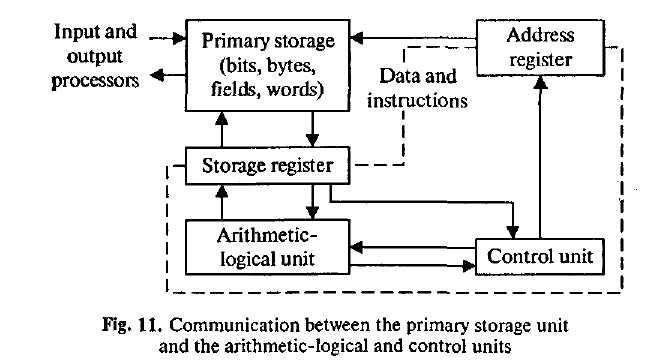
Computer system architecture is organized around the primary storage unit because all data and instructions used by the
Английский
язык. Основы компьютерной грамотности 86
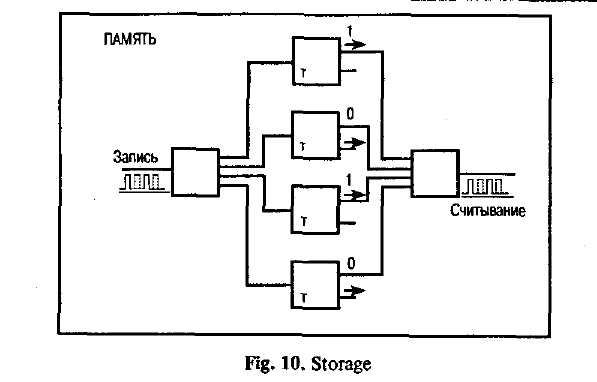
As you know, there are primary and secondary storage units. Both contain data and the instructions for processing the data. Data as well as instructions must flow into and out of primary storage.
Primary storage is also called main storage or internal storage. The specific functions of internal storage are to hold (store): 1) all data to be processed; 2) intermediate results of processing; 3) final results of processing; 4) all the instructions required for ongoing process. Another name for primary storage is memory, because of its similarity to a function of the human brain. However, computer storage differs from human memory in important respects. Computer memory must be able to retain very large numbers of symbol combinations, without forgetting or changing any details. It must be able to locate all its contents quickly upon demand. The combinations of characters, that is, the letters, numbers, and special symbols by which we usually
87 Unit 7. Storage
c ommunicate,
are coded. The codes used by computer designers are based upon a
number system that has only two possiblevalues,
0 and 1 .'A number system with only two digits, 0 and I, is
called a
binary number system. Each
binary digit is called a bit, from Binary digiT. As the information
capacity of a single bit is limited to 2 alternatives, codes used by
computer designers
are based upon combinations of bits. These combinations are called
binary
codes. The
most common binary codes are 8-bit codes
because an 8-bit code provides for 2/8, or 256 unique combinations
of l's ans O's, and this is more than adequate to represent all of
the characters by which we communicate.
ommunicate,
are coded. The codes used by computer designers are based upon a
number system that has only two possiblevalues,
0 and 1 .'A number system with only two digits, 0 and I, is
called a
binary number system. Each
binary digit is called a bit, from Binary digiT. As the information
capacity of a single bit is limited to 2 alternatives, codes used by
computer designers
are based upon combinations of bits. These combinations are called
binary
codes. The
most common binary codes are 8-bit codes
because an 8-bit code provides for 2/8, or 256 unique combinations
of l's ans O's, and this is more than adequate to represent all of
the characters by which we communicate.
Data in the form of coded characters are stored in adjacent storage locations in main memory in two principal ways : 1) as "strings" of characters — in bytes; and 2) within fixed-size "boxes" — in words. A fixed number of consecutive bits that represent a character is called a byte. The most common byte size is 8-bit byte. Words are usually 1 or more bytes in length.
Secondary storage. Primary storage is expensive because each bit is represented by a high-speed device, such as a semiconductor. A million bytes (that is, 8 million bits) is a large amount of primary storage. Often it is necessary to store many millions, sometimes billions, of bytes of data. Therefore slower, less expensive storage units are available for computer systems. These units are called secondary storage. Data are stored in them in the same binary codes as in main storage and are made available to main storage as needed.
3. Просмотрите текст еще раз. Ответьте на вопросы, используя информацию текста.
1. What are the functional units of a digital computer? 2. What units make up the central processing unit? 3. How is computer system organized? 4. What are the two main types of storage units? 5. What do they contain? 6. What is the function of a primary storage? 7. Why is primary storage often called memory? 8. In what respect does computer memory differ from human memory? 9. What are codes based on? 10. What is Secondary storage and what is it used for?
Английский язык. Основы компьютерной грамотности 88
4. Найдите в тексте английские эквиваленты следующих словосочетаний:
Функциональный блок; цифровой компьютер; устройство ввода; устройство управления; арифметико-логическое устройство; центральный процессор; структура компьютерной системы; первичное запоминающее устройство; вторичное ЗУ; рассмотрение; поэтому последовательность; оперативное ЗУ; внутренняя память; промежуточные результаты; подобие функции человеческого мозга; размешать содержимое по требованию; система счисления; двоичная система счисления; возможные величины; объем информации; двоичный код; смежные ячейки памяти; последовательность символов; быстродействующее устройство; полупроводник; доступный.
5. Вспомните значение новых слов и попытайтесь переве сти словосочетания, употребляемые с этими словами.
Storage: available storage; buffer storage; computer storage; data storage; magnetic disk storage; magnetic tape storage; input storage; intermediate storage; internal storage; laser storage; main storage; primary storage; secondary storage; sequential-access storage; variable storage; virtual storage.
Value: absolute value; acceptable value; additional value; binary value; byte value; character value; constant value; correct value; data value; digit value; discrete values; invalid value; negative value; numerical value; output value; valid value.
Digit: binary digit; binary-coded digit; check digit; information digit; input digit; nonsignificant digit; significant digit; digit-by-digit.
Sequence: out of sequence; alphabetic sequence; arithmetic sequence; binary sequence; character sequence; code sequence; instruction sequence;data sequence; digital sequence; historical sequence; increasing sequence; program sequence; string sequence.
6. Найдите в тексте слова, близкие по значению следующим:
Memory; element; information; command; examination; character; quantity; number; place; computer architect; likeness.
To apply; to form; to move; to hold; to demand; to connect; to supply; to place; to name; to start; to examine.
Continuous; significant; consecutive; usual; enough; main; initial; general.
89 Unit 7. Storage
7. Переведите предложения, содержащие Perfect Participle Active и Perfect Participle Passive.
1. Having finished the research the scientists made the analysis of the data obtained. 2. The designer left the office having looked through all the documents. 3. Having discussed the functions of storage units we passed on to the consideration of control processing unit. 4. Having limited the information capacity of a single bit to two alternatives the computer designers expressed data by a combination of bits. 5. Having translated the program into machine language the computer architect put the program into the machine. 6. Having been coded the instruction was transmitted to the central processing unit. 7. Having been transmitted to the central processing unit the instruction made arithmetic-logical unit perform some computations. 8. Having been regulated by the operator the equipment operated well. 9. Data having been entered correctly into the computer component of a data processing system, the need for further manipulation by humans is eliminated. 10. Having been well prepared for the examination the pupils could answer all the questions the teacher asked them.
8. Ознакомьтесь с терминами текста 2.
medium (pi. media) — носитель; среда capacity — емкость; объем (памяти); пропускная способность
media capacity — емкость носителя
data access time — время доступа к данным
per bit — на единицу информации
to transfer— передавать(ся); переносить(ся); пересы-лать(ся)
archival storage — архивное ЗУ; архивная память to depend — зависеть от; полагаться, рассчитывать на to rotate — вращать(ся); чередовать(ся); сменять(ся) reason — причина; основание; довод; обосновывать;
делать вывод
solid-state device — твердотельный прибор magnetic core — магнитный сердечник
Английский язык. Основы компьютерной грамотности 90
b ipolar
semiconductor
— биполярный полупроводник
ipolar
semiconductor
— биполярный полупроводник
metal-oxide semiconductor (MOS) — структура металл-оксид-полупроводник randomly — произвольно
random-access memory (RAM) — оперативное запоминающее устройство (ОЗУ)
sound recording — звукозапись
to arrange — размещать; располагать; устанавливать;
монтировать tape device — ЗУ на магнитной ленте
to range — классифицировать; располагать в порядке; лежать в диапазоне
magnetic disc storage — ЗУ на магнитном диске
moving-head device — устройство с двигающейся головкой
predominant — преобладающий; доминирующий flexible —гибкий; настраиваемый; изменяемый floppy (disk) — гибкий диск(ета); ЗУ на гибком диске to meet the demands — удовлетворять потребности
9. Прочтите текст 2 и скажите, как вы понимаете термин «запоминающая среда» и какие компоненты ее составляют. Переведите текст.
Text 2. STORAGE DEVICES
Storage media are classified as primary storage or secondary storage on the basis of combinations*of cost, capacity, and access time. The cost of storage devices is expressed as the cost per bit of data stored. The most common units of cost are cents, millicents (0.001 cents) and microcents (0.000001 cents). The time required for the computer to locate and transfer data to and from a storage medium is called the access time for that medium. Capacities range from a few hundred bytes of primary storage for very small computers to many billions of bytes of archival storage for very large computer systems.
Memories may be classified as electronic or electromechanical. Electronic memories have no moving mechanical parts, and
91 Unit 7. Storage
d ata
can be transferred into and out of them at very high speeds.Electromechanical
memories depend upon moving mechanical parts
for their operation, such as mechanisms for rotating magnetic
tapes and disks. Their data access time is longer than is that
of electronic memories; however they cost less per bit stored and
have larger capacities for data storage. For these reasons most
computer
systems use electronic memory for primary storage and
electromechanical
memory for secondary storage.
ata
can be transferred into and out of them at very high speeds.Electromechanical
memories depend upon moving mechanical parts
for their operation, such as mechanisms for rotating magnetic
tapes and disks. Their data access time is longer than is that
of electronic memories; however they cost less per bit stored and
have larger capacities for data storage. For these reasons most
computer
systems use electronic memory for primary storage and
electromechanical
memory for secondary storage.
Primary storage has the least capacity and is the most expensive; however, it has the fastest access time. The principal primary storage circuit elements are solid-state devices: magnetic cores and semiconductors. For many years magnetic cores were the principal elements used in digital computers for primary storage. The two principal types of semiconductors used for memory are bipolar and metal-oxide semiconductors (MOS). The former is faster, the latter is more commonly used at present. Because data can be accessed randomly, semiconductor memories are referred to as random-access memory, or RAM.
There is a wide range of secondary storage devices. Typical hardware devices are rotating electromechanical devices. Magnetic tapes, disks, and drums are the secondary storage hardware most often used in computer systems for sequential processing. Magnetic tape, which was invented by the Germans during World War II for sound recording, is the oldest secondary storage medium in common use. Data are recorded in the form of small magnetized "dots" that can be arranged to represent coded patterns of bits.
Tape devices range from large-capacity, high-data-rate units used with large data processing systems to cassettes and cartridges used with small systems. Magnetic disk storage, introduced in the early 1960s, has replaced magnetic tape as the main method of secondary storage. As contrasted with magnetic tapes, magnetic discs can perform both sequential and random processing. They are classified as moving-head, fixed-head, or combination moving-head and fixed-head devices. Magnetic discs are the predominant secondary storage media. They include flexible, or floppy discs, called diskettes. The "floppies" were introduced by IBM in 1972 and are still a popular storage medium to meet the demands of the microcomputer market.
1 0. Ответьте
на вопросы, используя информацию текста.
0. Ответьте
на вопросы, используя информацию текста.
1. How are storage media classified? 2. How is the cost of storage devices expressed? 3. What is the access time for storage media? 4. How does the storage capacity range? 5. What are the two main types of storage devices? 6. What are electronic storage devices? 7. What are the principal primary storage circuit elements? 8. What are the main secondary storage devices? 9. What is the oldest secondary medium and when was it invented? 10. What is a floppy?
11. Найдите в тексте английские эквиваленты следующих словосочетаний:
Запоминающие устройства; носители памяти; первичные ЗУ; вторичные ЗУ; время доступа; стоимость ЗУ; диапазон емкости памяти; архивная память; движущиеся механические части; вращающиеся магнитные ленты и диски; по этим причинам; твердотельные устройства; магнитные сердечники; полупроводники; оперативное ЗУ; аппаратное обеспечение вторичной памяти; звукозапись; . намагниченные точки; представлять зашифрованную комбинацию единиц информации; в отличие от магнитных лент; последовательная и произвольная обработка; устройства с движущейся и фиксированной головкой; удовлетворять потребности; гибкий диск.
12. Опишите схему.
93 Unit 7. Storage
13. Переведите предложения, содержащие всевозможные формы причастий: Participle I, Participle II, Perfect Participle Active и Perfect Participle Passive.
1. Electromechanical memories depend upon moving mechanical parts for their operation. 2. The time required for the computer to locate and transfer data to and from a storage medium is called the access time. 3. Being not visible software makes possible the effective operation of computer system. 4. Having invented magnetic tapes the Germans used them as the secondary storage medium. 5. When properly programmed computers don't make computational errors. 6. Having been introduced in the early 1960s magnetic disc storage has replaced magnetic tape storage. 7. The control unit interpreting instructions is one of the important parts of any computer system. 8. Data recorded in the form of magnetized dots can be arranged to represent coded patterns of bits. 9. As contrasted with magnetic tapes magnetic discs can perform both sequential and random processing. 10. While having no moving mechanical parts electronic memories can transfer data at very high speed.
14. Выполните письменный перевод текста по вариантам.
DIGITAL COMPUTER OPERATION
1. A digital computer is a machine capable of performing operations on data represented in digital or number form. The individual operations performed by a digital computer are very simple arithmetic or logical processes involving the manipulation of the bits in words or characters of information. The great power of any digital computer rests in the ability to store large volumes of data and to perform these operations at extremely high speed.
In most electronic digital computers the method of number representation is based on the system of binary notation. The binary notation system is most widely used because of the convenience in constructing logical circuits and storage devices capable of handling data in this form. For example, a magnetic memory unit consists of many thousand individual magnetic cells, each of which can be energized in either of two ways to represent the binary digits 0 or 1. If these cells are grouped to form words or binary coded characters, information can be
Английский язык. Основы компьютерной грамотности 94
s tored
for processing in units of specified size. In the same way,digital
data can be recorded as a series of magnetized spots on a magnetic
tape or a magnetic disk.
tored
for processing in units of specified size. In the same way,digital
data can be recorded as a series of magnetized spots on a magnetic
tape or a magnetic disk.
2. The computer has pervaded most fields of human activity and is the most important innovation of our age. Born out of the technology of communication, it is capable of handling enormous amounts of information at tremendous speeds. What makes it so potent is the fact that a single mechanism can perform any information-processing task. The same mechanism can control industrial processes, guide space vehicles or help to teach children. This diversity of tasks is made possible by the simple idea of the stored program.
A program is the enumeration of determining commands. It specifies the method used for the solution of a problem in detail. When the machine is. in operation, both the commands and the numbers to be processed are constantly being taken out of and put into a depository of information known as a memory.
It can be seen that the processes performed by a digital computer are essentially simple. These operations can be performed at extremely high speeds and with a high degree of coordination between the different functional units of the hardware system, and this ability means that digital computers can undertake highly complex tasks.