Материал: English_for_IT_I-II_years
Task 6. Translate the sentences into Ukrainian:
1. Data are processed to become useful information. 2. We use the term data processing to include the resources applied for processing of information. 3. The resources required for accomplishing the processing of data are called a data processing system. 4. Processing is a series of operations converting inputs into outputs. 5. Facilities are required to house the computer equipment. 6. Egyptians used the information to predict crop yields. 7. The information to be put into the computer for processing should be coded into ones and zeroes. 8. Processing is operations on data to convert them into useful information. 9. The first machines designed to manipulate punched card data were widely used for business data processing. 10. Hollerith built one machine to punch the holes and the other to tabulate the collected data.
Task 7. Match these words with their definitions.
|
|
Text 9b. Word processing facilities start up
Describe what you see in the picture of a window below.
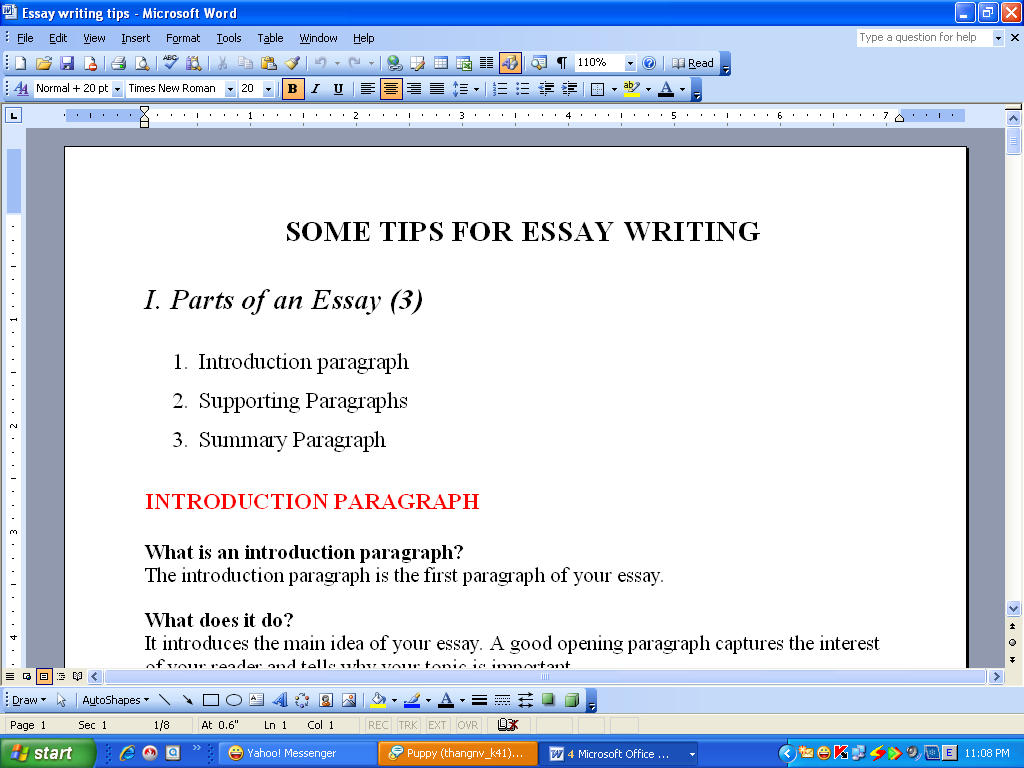
Writing letters, memos or reports are the ways most people use computers. They manipulate words and a text on a screen – primarily to print at some later time and store for safe keeping. Computers alleviate much of the tedium associated with typing, proofing and manipulating words. Because computers can store and recall information so readily, documents need not be retyped from scratch just to make corrections or changes. The real strength of word processing lies in this ability to store, retrieve and change information. Typing is still necessary (at least, for now) to put the information into the computer initially, but once in, the need to retype only applies to new information.
Word processing is more than just typing, however. Features such as Search and Replace allow users to find a particular phrase or word no matter where it is in a body of text. This becomes more useful as the amount of text grows.
Word processors usually include different ways to view the text. Some include a view that displays the text with editor’s marks that show hidden characters or commands (spaces, returns, paragraph endings, applied styles, etc.) Many word processors include the ability to show exactly how the text will appear on paper when printed. This is called WYSIWIG (What You See Is What You Get, pronounced “wizzy-wig”). WYSIWIG shows bold, italic, underline and other style characteristics on the screen so that the user can clearly see what he or she is typing. Another feature is the correct display of different typefaces and format characteristics (margins, indents, super- and sub-scripted characters, etc.). This allows the user to plan the document more accurately and reduces the frustration of printing something that doesn’t look right. Many word processors now have so many features that they approach the capabilities of layout applications for desktop publishing. They can import graphics, format multiple columns of text, run text around graphics, etc.
Two important features offered by word processors are automatic hyphenation and mail merging. Automatic hyphenation is the splitting of a word between two lines so that the text will fit better on the page.
The word processor constantly monitors words typed and when it reaches the end of a line, if a word is too long to fit, it checks that word in a hyphenation dictionary. This dictionary contains a list of words with the preferred places to split it. If one of these cases fits part of the word at the end of the line, the word processor splits the word, adds a hyphen at the end and places the rest on the next line. This happens extremely fast and gives text a more polished and professional look.
Mail merge applications are largely responsible for the explosion of ‘personalized’ mail. Form letters with designated spaces for names and addresses are stored as documents with links to lists of names and addresses of potential buyers or clients. By designating what information goes into which blank space, a computer can process a huge amount of correspondence substituting the ‘personal’ information into a form letter. The final document appears to be typed specifically to the person addressed.
Many word processors can also generate tables of numbers or figures, sophisticated indices and comprehensive tables of contents.
Task 8. Answer the following questions.
What is a word processor?
What makes word processors superior to traditional typewriters?
Name the ability of word processors to show how the text will appear on paper.
What do the letters WYSIWYG stand for?
Describe two important features offered by word processors.
What word-processing feature is responsible for “personalized” mail?
Task 9. Mark these statements as True or False.
When you get to the end of each line, Word starts a new line automatically. This feature is called word wrap.
Documents have to be retyped to make corrections or changes.
The user can plan the document more accurately by means of format characteristics.
The word processor monitors words typed and when it reaches the end of a line…
Some word processors can generate tables of numbers, indices and tables of contents.
Task 10. Find the English equivalents to the following word combinations.
на екрані; полегшувати; відшукувати інформацію; вид, проекція (тексту); розлад (планів); розділити слово (для переносу); підходити, відповідати; контролювати; бути відповідальним за що-небудь; підставляти, замінювати; складні індекси
Task 11. Look at the words in the box and complete the following sentences with them. Use the information in the text.
type style, WYSIWYG, format, indent, font menu, justification, mail merging |
1. … stands for 'What you see is what you get'. It means that your printout will precisely match what you see on the screen.
2. … refers to the process by which the space between the words in a line is divided evenly to make the text flush with both left and right margins.
3. You can change font by selecting the font name and point size from the … .
4. … refers to a distinguishing visual characteristic of a typeface; 'italic', for example is a … that may be used with a number of typefaces.
5. The … menu of a word processor allows you to .set margins, page numbers, spaces between columns and paragraph justifications.
6. … enables you to combine two files, one containing names and addresses and the other containing a standard letter.
7. An … is the distance between the beginning of a line and the left margin, or the end of a line and the right margin. An indented text is usually narrower than a text without … .
Task 12. Complete the following conversation with the given words
finally command first Edit
now mistake next insert
A: Do you know how I can move this paragraph? I want to put it at the end of this page.
B: Er.. I think so. (1)………….. you use the mouse to select the text that you want to move…and then you choose the Cut…………….. (2) from the Edit menu..
A: Like this?
B: Yes. The selected text disappears and goes onto the Clipboard. And (3)……………….you find where you want the text to appear and you click to position the (4)………………..point in this place.
A: Mm.. is that OK?
B:Yes, if that’s where you want it. (5)………………… choose Paste from the (6)………….menu, or hold down Command and press V. (7)……………check that the text has appeared in the right place.
A: What do I do if I make a (8)………………..?
B: You can choose Undo from the Edit menu which will reverse your last editing command.
A: Brilliant! Thanks a lot.
Task 13. Read the text below:
Advantages of computer data processing
Computer-oriented data processing systems or just computer data processing systems are not designed to imitate manual systems. They should combine the capabilities of both humans and computers. Computer data processing systems can be designed to take advantage of four capabilities of computers.
1. Accuracy. Once data have been entered correctly into the computer component of a data processing system, the need for further manipulation by humans is eliminated, and the possibility of error is reduced. Computers, when properly programmed, are also unlikely to make computational errors. Of course, computer systems remain vulnerable to the entry by humans of invalid data.
2. Ease of communications. Data, once entered, can be transmitted wherever needed by communications networks. These may be either earth or satellite-based systems. A travel reservations system is an example of a data communications network. Reservation clerks throughout the world may make an enquiry about transportation or lodgings and receive an almost instant response. Another example is an office communications system that provides executives with access to a reservoir of date, called a corporate data base, from their personal microcomputer work stations.
3. Capacity of storage. Computers are able to store vast amounts of information, to organize it, and to retrieve it in ways that are far beyond the capabilities of humans. The amount of data that can be stored on devices such as magnetic discs is constantly increasing. All the while, the cost per character of data stored is decreasing.
4. Speed. The speed, at which computer data processing systems can respond, adds to their value. For example, the travel reservations system mentioned above would not be useful if clients had to wait more than a few seconds for a response. The response required might be a fraction of a second.
Thus, an important objective in the design of computer data processing systems is to allow computers to do what they do best and to free humans from routine, error-prone tasks. The most cost-effective computer data processing system is the one that does the job effectively and at the least cost.
Task 14. Find the equivalents from the text.
Система обробки інформації комп'ютером; система орієнтування на обробку даних комп'ютером; поєднувати можливості людини і машини; обмежувати управління; навряд чи допустять помилку; залишатися вразливим; неприпустимі дані; легкість здійснення зв'язку; мережа передачі інформації; системи, базуються на використанні супутників; отримати миттєву відповідь; наводити довідки; сховище даних; корпоративна база даних; обсяг пам'яті; запам'ятовувати величезну кількість інформації; витягувати інформацію; додати значимості; згаданий вище; частка секунди; схильний до помилок.
Task 15. Translate the words.
То eliminate: elimination; eliminable; eliminator; unlimited.
To respond: respondent; response; responsible; irresponsible; responsibility.
Accuracy: inaccuracy; accurate; inaccurate; accurately.
Correctly: correct; incorrect; to correct; correction; correctional; corrective; corrector.
Vulnerable: invulnerable; vulnerability; invulnerability.
Invalid: valid; invalidity; validity;
Access: accessible; inaccessible; accessibility; inaccessibility.
Grammar review The Modal Verbs (mv) can/could
Meaning |
Forms of the MV |
Forms of the infinitive |
Kinds of sentences |
Some other ways of expressing the same meaning |
Sentence patterns |
1. Ability, capability |
can (can’t) – the Present Tense could (couldn’t) – the Past Tense |
Indefinite Infinitive |
affirmative interrogative negative |
to be able to, to know how to do smth, to have the ability to do smth. |
He can perform complicated operations. He is a very skilful surgeon. Can she swim well? He could not feel or hear anything. |
2. Possibility due to circumstances |
can (can’t) – the Present Tense could (couldn’t) – the Past Tense |
Indefinite Infinitive |
affirmative interrogative negative |
to be able to, it’s possible to do smth |
At a chemist’s shop you can get medicines of all kinds. I can go to the seaside this summer if I have enough money. |
3. a)Permission
b) Request
c)Prohibition |
can – the Present Tense could – the Past Tense in Reported Speech
can could (a polite request)
can’t |
Indefinite Infinitive
Indefinite Infinitive
Indefinite Infinitive |
affirmative
interrogative
negative |
to permit, to be allowed |
The doctor said: “You can take long walks early in the morning”
Can (could) you give me some medicine for my headache?
You can’t visit him, he has an infectious disease. |
4. Unreality |
could – the Subjunctive II Form |
The Indefinite Infinitive refers the action to the present or future. The Perfect Infinitive indicates the action which was not carried out in the past |
affirmative interrogative negative |
would be able to do smth;
would have been able to do smth |
Why don’t you want the doctor to come? He could prescribe some medicine to bring down the fever (if he came). You could have stayed in bed for a few days. But you didn’t. |
5. Uncertainty, doubt, astonishment |
can/could |
The Indefinite Infinitive refers the action to the present or future.
The Continuous Infinitive refers the action to the present. The Perfect Infinitive refers the action to the past. The Perfect Continuous Infinitive denotes an action begun in the past and continued into the moment of speaking |
interrogative (general questions) |
Is it possible that … ? Do you believe that …? |
Can (could) he be her husband? He is twice as old as she is. |
|
Can (could) she still be running a high temperature? Can (could) he have been operated on?
Can (could) they have been keeping to a diet for a few years? |
||||
6. Incredulity, improbability |
can’t/ couldn’t |
Indefinite Infinitive
Continuous Infinitive
Perfect Infinitive
Perfect Continuous Infinitive |
negative |
It’s hardly possible that; I refuse to believe that; I don’t think it’s possible that; it’s next to impossible that; I don’t believe that; I doubt that; It’s incredible (doubtful) that |
He can’t (couldn’t) be her husband. She can’t (couldn’t) be still running a high temperature. He can’t (couldn’t) have been operated on. They can’t (couldn’t) have been keeping to a diet for a few years. |
7. For emotional colouring |
can/could (in present time contexts) |
Indefinite Infinitive Continuous Infinitive Perfect Infinitive Perfect Continuous Infinitive |
interrogative (special questions) |
|
What can (could) you know of such things? What can (could) they be speaking about? How can (could) you have made such a mistake? What can (could) he have been doing all this time? |