Материал: English_for_IT_I-II_years
4. "I have good news and bad news," the defence attorney told his client. "First, the bad news. The blood test came back, and your DNA is an exact match with that found at the crime scene." "Oh, no!" cried the client. "What's the good news?" "Your cholesterol has gone down to 140."
(From "Stupid Men's Jokes")
Exercise 11. Read the jokes and retell them in indirect speech
1. If an Englishman gets run down by a truck, he apologizes to the truck.
2. A foreign visitor to England is completely baffled by the language and struggles with the pronunciation of words such as "enough", "bough" and "though". He usually gives up altogether when he reads a local newspaper headline "Fete Pronounced Success".
3. An American tourist comes to London to stay at a top hotel. He picks up the phone one morning and asks for room service. He says, "I want three overdone fried eggs that are hard as a rock, toast that is burnt to a cinder and a cup of black coffee that tastes like mud."
"I'm sorry, sir," replies room service, "we don't serve breakfast like that." "Well, you did yesterday!"
4. An old woman from the country is visiting the big city for the first time in her life. She checks in at a smart hotel and lets the bellboy take her bags. She follows him but as the door closes, her face falls. "Young man," she says angrily. "I may be old and straight from the hills, but I ain't stupid. I paid good money and this room won't do at all. It's short of what I expected. It's too small and there's no proper ventilation. Why, there's not even a bed!" "Ma'am," replies the bellboy, "this isn't your room. It's the elevator!"
Exercise 12. Translate.
1. Вчора я зустріла Марка і він розповів мені, що Хіггінси переїхали в новий триповерховий будинок на сусідній вулиці. Я відповіла, що якби у мене було стільки грошей, я б зробила те ж саме. 2. Джон сказав, що він хотів би запросити Мері повечеряти де-небудь в наступну суботу. 3. Місіс Морріс сказала, що Джим зараз дивиться фільм жахів і не хоче відповідати на дзвінок. 4. Філ сказав, що піде до лікаря наступного тижня. 5. Трейсі сказала, що статуя Свободи знаходиться в Америці. 6. Менеджер попросив мене не бути грубим з покупцями. 7. Селлі запитала мене, скільки мені було років, коли я вперше літала на літаку. 8. Біллі сказав, що кенгуру живуть в Австралії. 9. Вона сказала, що їй слід було б вибачитися. 10. Тренер сказав, що на вашому місці, я б не їв так багато вуглеводів перед сном. 11. Учитель попросив Майкла не розливати воду на підлогу. 12. Мама попросила Алана не чіпати руками гарячу духовку. 13. Містер Браун сказав зробити тихіше звук телевізора, вимкнути світло і не перемикати без кінця канали. 14. Боб запропонував нам сходити в кіно. Всі із задоволенням погодилися подивитися першу серію третього сезону улюбленого серіалу "Sherlock". 15. Ти не знаєш, чи є в цьому готелі Wi-Fi зона? А то я мамі обіцяв зателефонувати, як тільки ми поселимося. 16. Скажіть, будь ласка, тут можна (дозволяється) палити? 17. Поліція нас попередила, що гірські дороги дуже небезпечні і порадила не перевищувати швидкість, а особливо не виїжджати на зустрічну смугу і не здійснювати обгін.
Speaking/writing
Task. Topics for discussion (Speaking/Writing).
1. Speak on the operating system.
2. Speak on the most important program in an OS-the supervisor program.
3. What is Unix? Give its characteristics.
4. Speak about OS as hidden software.
Unit 6 graphical user interface
Vocabulary Bank Unit 6
Task 1. Read, write the translation and learn the basic vocabulary terms:
to add effects
approach
background screen
bitmapped
check boxes
content
contextual
cut and paste editor
desk accessories
drop-down menu
easy-to-use
evocative
execute a command
folders directories
generic
graphic applets
incorporated
instant access
intuitive
major
manipulation
overlap
partial
pop-up menu
pull-down menu
raster graphics
recall
rendering
recent trend
researcher
resolution
responsive
scope
search tool
self-explanatory icons
simultaneously
single prompt
standard procedure
text-based
to influence greatly
to offer
To perform
to release
to resemble
to restrict
transparency
two-dimensional
typed command labels
viewing area
volumetric
widespread
WIMP (Windows, Icons, Menus and Pointer)
Text 6a. The graphical user interface
The term ‘user interface’ refers to the standard procedures the user follows to interact with a particular computer. A good user interface is important because when you buy a program you want to use it easily. A few years ago, the way in which users had access to a computer system was quite complex. They had to memorize and type a lot of commands just to see the content of a disk, to copy files or to respond to a single prompt. So, a user interface based on graphics and intuitive tools was designed with a single clear aim: to facilitate interaction with the computer.
Nowadays most computers have a Graphical User Interface (GUI).
A GUI makes use a WIMP environment: Windows, Icons, Menus and Pointer. This type of interface is user-friendly, where system functions are accessed by selecting self-explanatory icons and items from menus.
Windows A window is an area of the computer screen where you can see the contents of a folder, a file, or a program. Some systems allow several windows on the screen at the same time and windows can overlap each other. The window on the top is the one which is «active», the one in use.
Icons are small pictures on the screen. They represent programs, folders, or files. For example, the Recycle Bin icon represents a program for deleting and restoring files. Most systems have a special area of the screen on which icons appear.
Menus give the user a list of choices. You operate the menu by pressing and releasing one or more buttons on the mouse.
The Pointer is the arrow you use to select icons or to choose options from a menu. You move the pointer across the screen with the mouse to use the object selected by the pointer.
A GUI offers graphical icons (graphic images (or intuitive symbols) representing programs, documents, an object or task), and visual indicators (as opposed to text-based interfaces), typed command labels or text navigation to fully represent the information and actions available to a user. A graphical user interface saves a lot of time: you don't need to memorize commands in order to execute an application; you only have to point and click so that its content appears on the screen.
|
Command Line Interface - CLI Static, Direct, Recall. Graphical User Interface - GUI Responsive, Indirect, Recognition. Natural User Interface - NUI Evocative, Contextual, Intuition. |
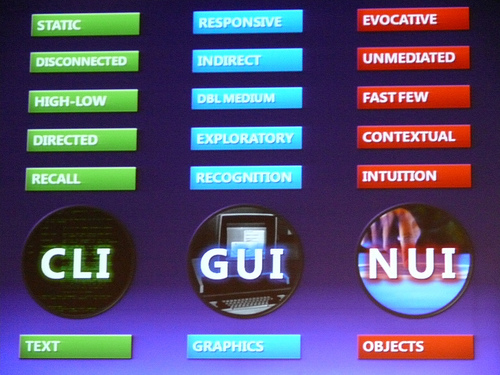
Double-clicking an icon opens a window that lets you work with different tools and menus. A window is a viewing area of the computer screen where you can see the contents of a folder, a file, or a program. Some systems allow several windows on the screen at the same time and windows can overlap each other. The window on the top is the one which is "active", the one in use. By using different windows you can work on several documents or applications simultaneously.
The actions are usually performed through direct manipulation of the graphical elements by the means of a drop-down menu, pop-up menu or pull-down menu (a list of options that appear below a menu bar when you click on an item). The tool for these manipulations is the pointer. The pointer is the arrow, controlled by the mouse, which allows you to move around the screen and choose options from menus. You operate the menu by pressing and releasing one or more buttons on the mouse.
Toolbar buttons are found at the top of a window, they take you to the Home folder and others. The dock is at the bottom of the screen that gives you instant access to the things you use most. When information has to be given to the user or input by the user, a window known as a dialog box is often used. It can contain a variety of elements to gather information from the user including: text boxes, drop-down list boxes, checkboxes and command buttons. A find dialog box is used to gather information from the user about the files they wish to find. All these activities take place on a desktop (the background screen that displays icons, representing programs, files and folders-directories or containers for documents and applications).
Today, the most innovative GUIs are the Macintosh, Microsoft Windows and IBM OS/2 Warp. These three platforms include similar features: a desktop with icons, windows and folders, a printer selector, a file finder, a control panel and various desk accessories. Double-clicking a folder opens a window which contains programs, documents or further nested folders. At any time within a folder, you can launch the desired program or document by double-clicking the icon or you can drag it to another location. The three platforms differ in other areas such as device installation, network connectivity or compatibility with application programs.
Designing the visual composition and temporal behaviour of GUI is an important part of software application programming in the area of human-computer interaction. Its goal is to enhance the efficiency and ease of use for the underlying logical design of a stored program, a design discipline known as usability. Methods of user-centred design are used to ensure that the visual language introduced in the design is well tailored to the tasks. Typically, the user interacts with information by manipulating visual widgets that allow for interactions appropriate to the kind of data they hold.
A GUI may be designed for the requirements of a vertical market as application-specific graphical user interfaces. Examples of application-specific GUIs are:
• Automated teller machines (ATM)
• Point-Of-Sale touch screens at restaurants
• Self-service checkouts used in a retail store
• Airline self-ticketing and check-in
• Information kiosks in a public space, like a train station or a museum
• Monitors or control screens in an embedded industrial application which employ a real time operating system (RTOS).
The latest cell phones and handheld game systems also employ application specific touch screen GUIs. Newer automobiles use GUIs in their navigation systems and touch screen multimedia centres.
Post-reading Exercises
Task 2. Discuss the following questions:
What is a graphical user interface?
What is the main purpose of using graphical interface?
In the area of interface design which is the goal of programming in the field of human-computer interaction?
What is the purpose of using the methods of user-centred design?
Name some of the needs of GUI design.
Which device recently, used GUI?
Is GUI used in handheld devices?
What are the advantages of a graphical user interface?
Task 3. Translate the following phrases into English. Use the text if necessary.
дослідницька група; робоча станція; переміщуючи на екрані; графічний інтерфейс користувача; тривимірне зображення; іновації; мав вплив; роздільна здатність; плоский екран; середовище;
Task 4. Define the following terms:
graphical user interface, desktop, easy-to-use interface, rendering, desk accessories, display, 3D user interface, icon, browse, resolution, menu, move around the screen, move up, move down, press the key, drop-down menu, windows, buttons, icons, manipulate images, compositing, without losing quality, addition of menus, to type in all the commands, old bulletin board communications program, post messages, reply to other people's messages, letter key, number key, to be successfully marketed, drawing programs, image-editing programs, computer art, digital art.
Task 5. What do the following abbreviations stand for?
GUI, WYSIWYG, PC, OS, CPU, 3D.
Task 6. Complete this extract from a wiki entry about Windows Vista.
improvement visual developed vulnerability tools networking viruses features |
Windows Vista is an operating system 1….. by Microsoft for use on personal computers. Development was completed on November 8, 2006; over the next three months it was released in stages to computer manufacturers, business customers, and shops. On January 30, 2007, it was released worldwide to the general public, and was made available for purchase and download direct from Microsoft. The release of Windows Vista comes more than five years after the introduction of Windows XP.
Vista contains hundreds of new and improved 2…... The most significant include an updated GUI and 3….. style called Windows Aero, improved search features, new multimedia creation 4….., and completely redesigned 5….., audio, print, and display sub-systems. However, perhaps the greatest 6….. has been to security. Windows XP suffered from 7….. to 8….. and malware, and it will be interesting to see to what extent this has been addressed in Vista.
Task 7. Choose the correct answer:
GUI a) graphic user interface; b) graphical user interface; c) graphical users interface;
OS a) operating system; b) operation system; c) operating systematisation;
WIMP a) windows, information, menus, pointer; b) windows, icons, memory, pointer; c) windows, icons, menus, pointer.