Материал: Unit 4
Unit 4 Computerizing a Data Base
-
Learn and memorize the new words:
to set up – встановлювати
to list – записувати в певному порядку
index card – алфавітний вказівник
to accumulate – накопичувати
to manipulate – керувати організаціями
to file – реєструвати
handy – зручний
to enable – давати змогу
cabinet – відділення, секція
to transfer – переміщати
to retrieve – виправляти
to update – змінювати, модифікувати
to pull out – витягувати (інформацію)
-
Form nouns by adding the suffix -ance (ence) and translate them into
Ukrainian:
Models. a) V (verb) + ance (-ence): to differ – difference.
to assist, to resist, to acquaint, to guide, to refer, to maintain;
b) V (verb) + ment: to require – requirement
to equip, to accomplish, to develop, to manage, to move, to measure;
c) A (adjective) + ance (-ence): excellent – excellence.
present, significant, different, important, distant, prominent, existent.
-
Translate into Ukrainian paying attention to the pseudo-international words
and international words. Sort them into two groups.
Assistant, practice, principal, file, plant, document, modern, interesting, information, index, card, organization, system, computer, material, person,
technical, talent, machine, form, manager, accumulation.
-
Fill in the table with missing parts of speech.
|
Noun |
Verb |
Adjective |
Adverb |
|
– creation – accumulator – – – – – retrieval |
– – to mange to accumulate – – to display to transfer to computerize – |
organization – manageable – designed useful – – – retrievable |
organizationally creatively – – – usefully – – – – |
5. Translate the terms and combinations with them:
database to file a card in box
database management system to manage data
organizational system to retrieve data
index card tool for collecting and manipulating data
file cabinet card collection
to display on the screen to set up a data base
to transfer information
6. Match the given words in pairs to make words-combinations. Translate them.
1. index a) system
2. organizational b) manually
3. to set up c) list
4. to sort d) card
5. ideal e) tool
6. alphabetical f) data
7. Read the following verbs and match them with the nouns:
“information” or “data” that go together to do special activities or operations.
Translate them into Ukrainian.
to sort, to collect , to create, to set up, to update, to retrieve, to accumulate, to pull
out, to display, to use, to manipulate, to manage.
8. Read and translate the next to clearly understand the purpose using a
data-base management system (DBMS).
Computerizing a data base
As you have seen, you can set up a useful data base manually—and you do, whenever you create any kind of list or record to organize Information. But what happens when your collection of data gets really big? You start out with notes on a single index card. Gradually you accumulate a pile of index cards. You set up an organizational system and file the cards in a box. Before long there's a second box, and then a third. Soon you need an index to your index cards in order to find information!
That's where a computer and a database management system come in handy. A computer, as you know, is an ideal tool for collecting and manipulating data. A data-base management system, or DBMS, is a special program designed to enable you to manage data on a computer in a useful way. With a database management system, you can transfer the contents of your cards, notebooks, and file cabinets onto disks. Then you can use the computer to retrieve the data, organize it, update it, and even sort through it for specific information. Need an alphabetical list of all the players in your baseball card collection? A list of those players born in 1987? A list of shortstops? Tell the computer what you want. In seconds it pulls the information out of your data base and displays it on the screen.
9. Give the English equivalents of the following terms and combinations with
them. Make up your own sentences.
Установити придатну базу даних; записувати у певному порядку; алфавітний вказівник; накопичувати безліч інформації; керувати операціями; реєструвати дані; зручний; переміщувати матеріал; надавати змогу; модифікувати, “витягувати” інформацію; виводити на екран.
Reading Comprehension Task.
10. Answer the following questions on the text.
1. How do you understand the meaning of the term “Data-Base Management System”? Give your own if possible.
2. What is the main purpose of DBM system?
3. What operations can you manipulate with it?
4. Explain the sequence of DBM’s work on the computer.
11. Work in pairs. Draw the scheme to show the better idea of DBMS work.
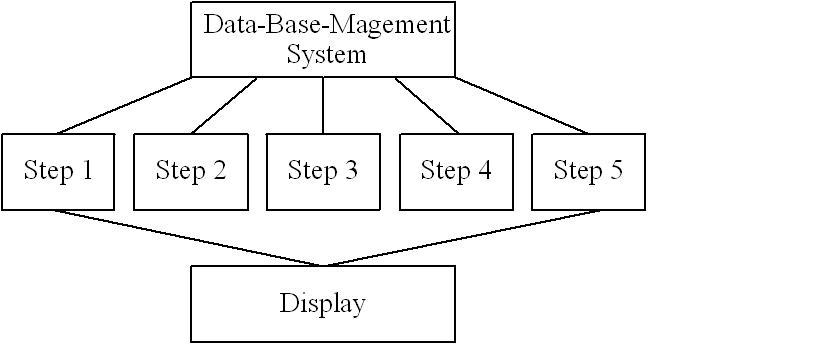
Make up a presentation of your ideas.
12. Speak on the main (general) idea of the text. Use the scheme above to
complete the following:
The text is about …
The subject of the text is …
It begins with the descriptions of …
Then it goes on to say that (how) …
To finish with it describes …
At the end of the text the example of …. is given to …
13. Prove the idea that a computer is an ideals tool for collecting and manipulating data. Discuss it in groups of four. Give all possible arguments.
14. Read the following instruction for using DBMS. They are mixed. Put them
in order to reproduce (in written) them.
-
Start out with notes form on a single index card.
-
Set up a useful data base manually to organize information.
-
Set up an organizational system and file the cards in a box.
-
Transfer the contents of your cards and file cabinets onto disks.
-
Use an index to your index cards in order to find information.
-
Retrieve the data, organize it, update it and sort it for specific information.
-
Pull the information out of your data base.
-
Display it on the screen.
15. Reproduce the procedure of using Data-Base Management System from the point of view of your own experience. Some additional details should be
mentioned.
16. Translate the following sentences into Ukrainian paying attention to
Participle II and its functions (attribute, predicate, adverb).
1. A data-base management system is a special program designer to enable you to manage data on a computer in a useful form.
2. Once data entered correctly into the data processing system the possibility of error is reduced.
3. Computers work according to the instructions given them by the users.
4. Electronic files used as data recording can serve us in our everyday work.
5. The programs written help users with different tasks.
6. When set up manually a useful data base is used to organize information.
17. Translate the following sentences containing Participle II in the function of
condition.
1. When written in a symbolic language programs require the translation into the machine language.
2. When used DBMS can help you to manipulate data in different ways.
3. As known all computer systems perform the functions of inputting, storing, processing, controlling and out putting.
4. As a special program designed, DBMS enable you to manage data on a
computer in a useful way.
18. Open the brackets and choose a verb in the required voice: active or passive.
1. Date-base management system (helps, are helped) you to manage data on a computer.
2. An index for your index cards (requires, is required) in order to find information.
3. A computer (knows, is knows) as an ideal tool for collecting and manipulating data.
4. We can (transfer, are transferred) the contents of our cards and file cabinets onto disks.
5. The alphabetic list (created, was created) to organize the in formation
required .
6. New methods of improvement of our project work (developed, have been developed) on the computer.
19. Read and translate the text 2. Get ready to give some information about the
advantages of using electronic files. Translate it in written form.
The Advantages of using electronic files.
The larger and more complex your collection of data is, the more likely it is that you should set up electronic files. Using electronic files, you can store data more efficiently in much less space. You can retrieve information in much less time with much less trouble.
To get a better idea of the advantages of using electronic files, let's compare what happens when you try to find a book using a familiar data base–a library card catalogue–and a computerized data base–a computerized catalogue. Consider the following situation.
You are interested in finding a book about the history of Australia. Assume that your library has a closed stack system for nonfiction books. You cannot just go up to the shelves and browse. To look at a book, you must fill out a request form, listing the title, author, and call number. A library clerk then brings the book to you. The library is often busy and you must wait your turn. Since you can request
only three books at a time, you must select your books carefully.
19. Answer the questions: Use the questions as a plant to talk about electronic
files.
1. What is an electronic file? Can you give your own definition?
2. What is the function of an electronic file?
3. What are the advantages of electronic files?
4. Are there any disadvantages?
5. What are performance characteristics of electronic files?
6. What rind of work did you perform using electronic files?
21. Complete the following sentences.
1. If you accumulate a large collection of data, you should ….
2. Using electronic files, you can store data ….
3. The next plus is that ….
4. A computerized catalogue is ….
5. The main function of electronic files are ….